
Appearance
How can I cancel my plan
This article explains how to cancel your Optimole paid plan and stop automatic renewals through FastSpring.
⚠️ Important: Uninstalling, deactivating, disconnecting, or no longer using the Optimole WordPress plugin does not cancel your paid subscription. Paid plans renew automatically through FastSpring until you cancel the subscription.
In this article
Before you uninstall Optimole: cancel auto-renewal first
Removing the plugin only stops Optimole on your site. It does not stop your billing agreement in FastSpring.
If you do not want your plan to renew, cancel auto-renewal first using one of the methods below.
Cancel from the Optimole dashboard
- Log in to your Optimole account at dashboard.optimole.com.
- Open Settings.
- Under your active plan, click Manage subscription.
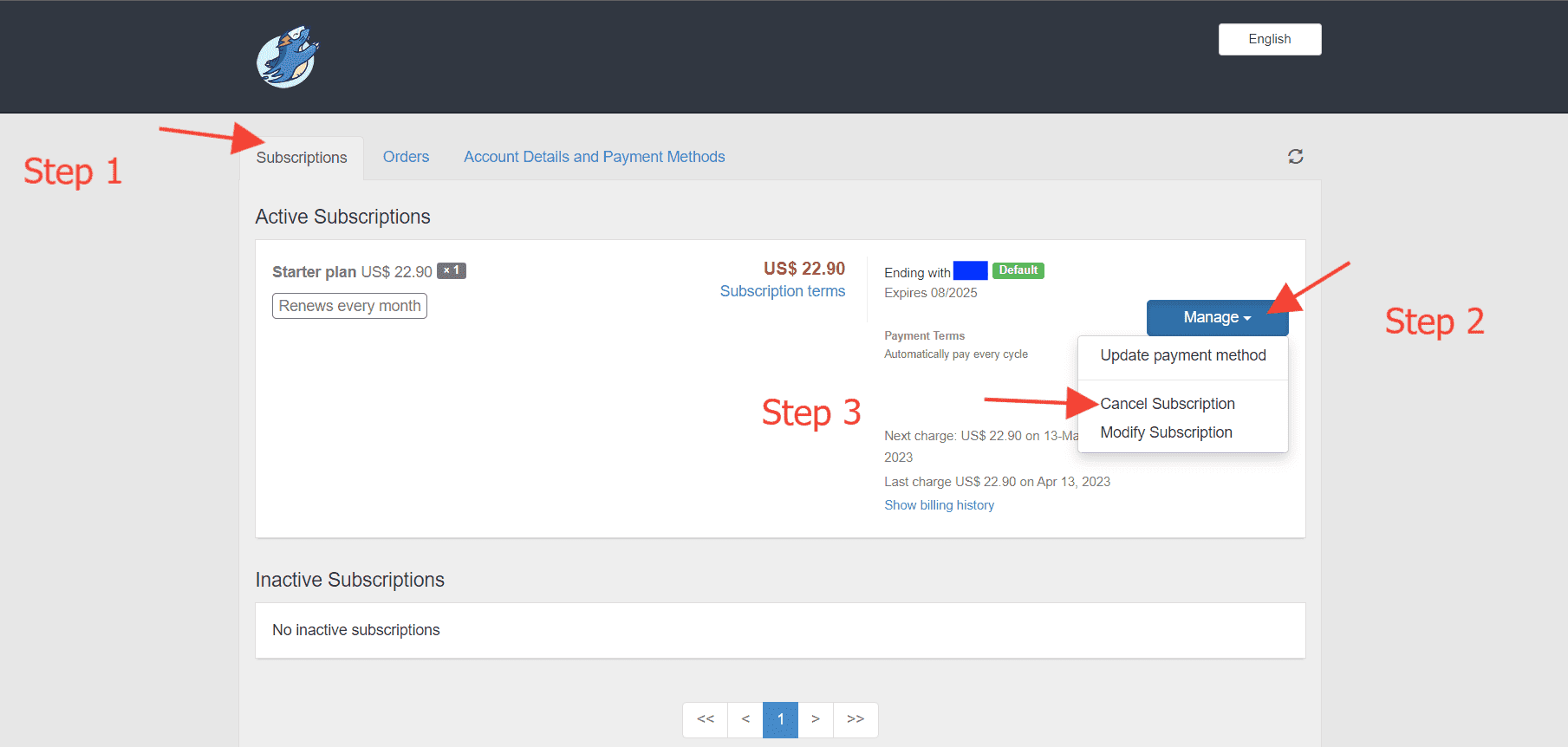
- In FastSpring, open the Subscription tab.
- Click Manage and then Cancel Subscription.
Cancel directly in FastSpring
- Open the FastSpring account page.
- Enter the email address you used when you purchased your Optimole plan.
- Open the Subscription tab.
- Click Manage and then Cancel Subscription.
What happens after cancellation
Canceling your subscription stops automatic renewal and future renewal charges, but your paid plan can still appear active until the current billing period ends; continued access alone does not mean another renewal will be charged.
To check that your plan will not renew, reopen your subscription details in FastSpring using either method above. Open the Subscription tab, click Manage, and check whether the details indicate that automatic renewal is disabled or cancellation is scheduled.
If your account is eligible for free service, Optimole automatically moves it to the Free Plan after paid access ends. You do not need to create another account, sign up for Free again, reinstall or reconnect the plugin, or change your plugin configuration.
If your account or domain is not eligible for active free service, it can remain disabled. For details on eligibility and restoration, check Account Suspended: You Exceeded Optimole Plan Limits.
After an automatic transition to the Free Plan, your account follows the current free-plan limits. For details, check What Happens If I Exceed Plan Limits?.
If you received a renewal notice
A renewal reminder means your subscription is still active. If you do not want to renew, cancel before the renewal date to avoid the next charge.
If you were already charged
Cancel the subscription to stop future renewals. This does not automatically refund the latest payment.
If the charge is recent, check How to Request a Refund? and contact Optimole support for billing help.
Troubleshooting access to the subscription
If you cannot cancel, or you completed the steps but cannot tell whether your plan will renew, contact Optimole support. Include your plan name, the email address used for the purchase (or any possible billing email addresses), and when you attempted to cancel so support can check the billing record. Support can also help when:
- you no longer have access to the purchase email address
- you cannot find an active subscription in FastSpring
- you are not sure which subscription should be canceled