
Appearance
How To Export The Images From Optimole?
Learn how to export your images from Optimole as a ZIP archive via the dashboard, and how to handle common extraction issues.
1. Navigate to the Optimole Dashboard and log in.
2. Open the Settings panel.
3. Switch to the Account area.
4. Scroll down to the Export images and click the Initiate an export button.
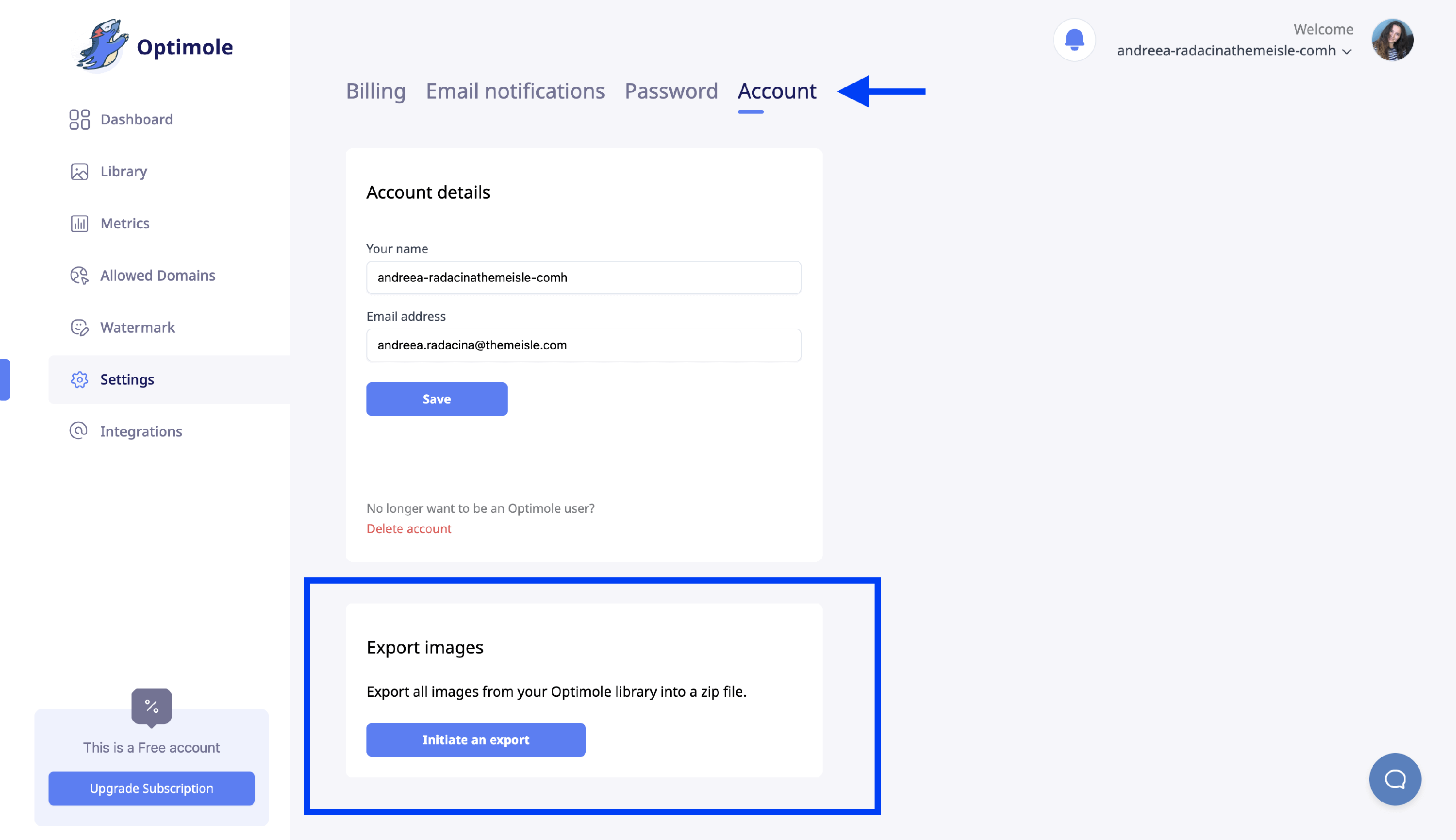
Depending on the size of your library, the export may be packaged as one or several ZIP parts. You will receive an email once it's ready.
In this article
What the export contains
The ZIP archive includes all image files stored in your Optimole account — original uploads, resized variants, and regenerated versions. This means the archive may contain multiple versions of the same filename.
The export includes image files only. It does not include your WordPress database or Media Library metadata, such as:
- attachment IDs
- Media Library entries
- alt text
- titles
- captions
- generated attachment metadata
- post or page content that references those images
📝 Note: Only images offloaded to Optimole storage are included. Files that were never processed by Optimole — such as images stored only in your local media library or on your server — are not part of the export and must be recovered from your site or server backup.
Important: An export is not a full Media Library backup
An Optimole export is an image-file export, not a full WordPress site backup or a complete Media Library backup.
⚠️ Warning: Keep a separate full-site backup that includes both your WordPress database and wp-content/uploads, especially before migrations, database cleanup, Media Library changes, or other major site work. The Optimole ZIP alone is not enough to fully restore your Media Library if WordPress attachment records are lost.
Can an export rebuild the WordPress Media Library?
No. Extracting the ZIP into your uploads folder — wp-content/uploads on a default WordPress installation — restores files to the filesystem, but it does not recreate the WordPress attachment records that make those files appear in Media > Library.
If the attachment records or their metadata are already missing from the WordPress database, Optimole cannot rebuild them from the export or through the plugin's image rollback feature that transfers offloaded images back to your server. That rollback process depends on the existing WordPress Media Library entries and their metadata to match files back to your site.
Recovery options when attachment records are missing
Use the recovery path that matches your situation:
- Restore a complete site backup that includes both the WordPress database and your uploads folder. This is the only reliable way to recover the original Media Library entries, attachment IDs, and metadata.
- If no full backup is available, manually re-upload the images to WordPress and recreate any needed metadata, such as titles, alt text, captions, and image associations inside your content.
How large exports are packaged
When your image library is large, Optimole automatically splits the export into multiple ZIP parts. Each part is a separate file, and together they contain your complete image set.
- You will see all parts listed in the export panel. The notification email contains a single link to your account settings page, where you can download each part.
- You must download every part to retrieve your complete library. Downloading only some parts will result in an incomplete set of images.
- There is no published limit on the number of parts or the size of each archive — the split happens automatically based on the size of your library.
How to extract a multipart export without losing files
Optimole stores all versions of your images — including thumbnails and regenerated variants — which can result in multiple files sharing the same name inside the archive. Default extraction tools on macOS and Windows may silently skip duplicate filenames or report an error instead of prompting you to resolve the conflict. This is why the extracted folder can appear to contain fewer files than expected even when every part was downloaded.
⚠️ Important: Do not extract with a tool or setting that silently overwrites or skips duplicate filenames. Doing so will cause earlier versions of images to be replaced or lost without warning.
Recommended extraction method
Use 7-Zip or PeaZip to extract each part:
- Download and install 7-Zip or PeaZip.
- Create a single destination folder for all extracted files.
- For each ZIP part, right-click the file and open it with your chosen tool.
- Extract to the same destination folder each time. When prompted about filename conflicts, select Auto rename, Keep both, or Keep all to preserve every version.
💡 Tip: If no conflict prompt appears during extraction, check the tool's preferences for a duplicate file or overwrite setting and configure it to rename duplicates automatically before extracting.
Why the extracted file count may be lower than expected
If the number of extracted files is lower than you expected, the most likely cause is that your extraction tool silently skipped or overwrote duplicate filenames rather than keeping all versions. Re-extract using 7-Zip or PeaZip with Auto rename, Keep both, or Keep all selected to recover every file.
ZIP appears corrupted or incomplete
If your extraction tool reports an error such as "Error 94 - Bad message" or "Unable to expand" on macOS, or shows the ZIP as corrupted, the export file itself is most likely valid. The native macOS Archive Utility can fail on large ZIP files even when the archive is completely intact. Use 7-Zip or PeaZip as described above instead of the built-in extraction tool.
If the export status is Failed
A Failed status in the dashboard means the export did not complete and no download is available. To resolve this:
- Return to Settings > Account > Export images and click Initiate an export to start a new export request.
- Wait for the notification email confirming the new export is ready.
- If the new export also shows a Failed status, contact Optimole support and include:
- The email address or domain associated with your Optimole account
- The approximate number of images in your library
- The export identifier shown in the dashboard, if one is displayed
- A screenshot of the Failed status
📝 Note: A Failed export status is a backend generation issue and is unrelated to the WordPress plugin, caching plugins, WP-Cron, or server resources. Those troubleshooting steps apply to the plugin-driven image rollback or offloading process, not to a dashboard export request.